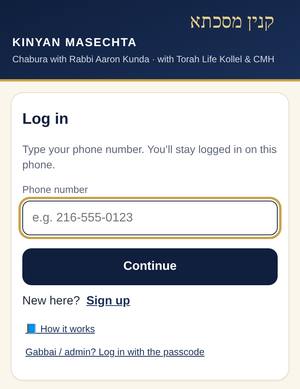
Sign up or log in with your phone
First time? Tap New here? Sign up, type your name, phone and email. Adam approves you, then you log in with just your phone number. You stay logged in.
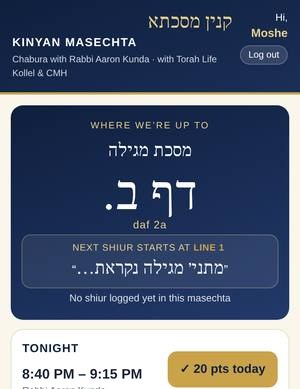
Home: where we’re up to
The top card shows the exact daf, line and words where the shiur ended, and right under it today’s chazara, named by the shiur it reviews (for example “Chazara on Wed night’s shiur (Megillah 23a–23b)”). Tap Show the text to read it.
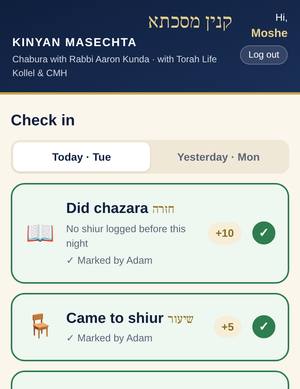
Tap “Did chazara” each day
Go to Check in and tap the big buttons: Did chazara, Came to shiur, On time. Chazara is always on the shiur before, and the button says which one: under Today (Thursday) it reads “Did chazara on Wed night’s shiur”. Did your chazara on last night’s shiur? Tap it under Today, and the question on it pops up. Forgot yesterday? Yesterday’s buttons stay open until 9:15 PM, then they close. One exception: the weekend chazara (below) stays open until Sunday 9:15 PM. Forgot to mark something after that? Ask the gabbai/admin to add it.
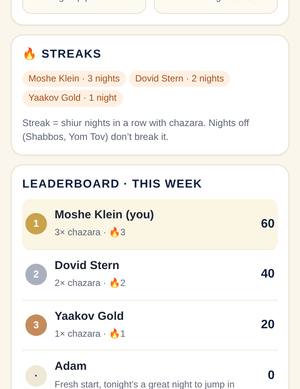
Points & leaderboard
Each check-in gives points: Came to shiur 5, On time 3, Did chazara 10, and +2 for a right answer to the chazara question (from Wed, Oct 21; earlier nights keep what they earned). Stats shows this week, this month and all-time, plus chazara streaks. Your total and history are under More › My points. Points also buy gift cards (below).
Chazara question (+2)
When you tap Did chazara, a question pops up on the Gemara of the shiur named on the button (“Question on Wed night’s shiur — Megillah 23a–23b”): 4 answers, pick one. You get one try. Right = +2 points. Wrong = it shows you the right answer, no points. Marked chazara before the question was up? Home shows “Chazara question waiting”, tap it to answer.
🎟️ Weekly raffle: $18 gift card
Every week one name wins an $18 gift card. Every shiur night (Sun–Thu) you earn tickets: came = 1, on time = +1, chazara = +1, right answer to the chazara question = +1 (up to 4 a night). More tickets, better odds. The winner is drawn Thursday at 9:10 PM and shown in the app. Home shows your tickets this week. The weekend chazara and the Shabbos chazara count for the next week.
🎁 Gift card store
Trade your points for a gift card to a local restaurant or store of your choice: $10 = 200 pts, $18 = 350 pts, $25 = 500 pts, $50 = 1,000 pts. Go to More › Gift cards & raffle and tap Get it. Adam works out the place with you; the points come off when you get the card. Points never reset, so you can save up.
Friday email + weekly recap
Every Friday afternoon you get a short email with the week: who came, chazara, points, raffle tickets, the raffle winner and where we reached. It also has This week’s learning: the Gemara we learned, a short summary, a few tidbits and 2–3 bonus questions. Answer them on the site (Home shows “Bonus questions”): one try each, +2 points for a right answer (no raffle tickets). They stay open until the next Friday email. There’s a link at the bottom to stop the email.
Reminders (automatic)
Every member with an email gets chazara reminders, nothing to turn on. If you haven’t marked chazara, you get one short email, 1 hour before the next shiur (7:40 PM), naming the shiur and with a button to check in. Already marked it? No email. Never Friday night or Shabbos, never twice for the same night. Don’t want them? Tap Unsubscribe at the bottom of the email.
Weekend chazara
Chazara on Thursday night’s shiur is its own weekend slot: “Weekend chazara on Thu night’s shiur”. It is open on Friday, then after Havdalah on Motzei Shabbos and all Sunday until 9:15 PM. On Motzei Shabbos and Sunday it has its own Weekend chazara button on the check-in page and its own card on Home. It counts once, toward the new week’s raffle.
Shabbos chazara
Home shows This Shabbos’s chazara, usually the week’s learning. It fills in as the week goes on. Log it after Havdalah on Motzei Shabbos under Today, or on Sunday under Yesterday before 9:15 PM.
Can’t use the app?
No problem. Text Adam what you did and he’ll log it for you. A printed weekly chazara sheet is also available.
Put it on your home screen
iPhone: open the app in Safari, tap Share › Add to Home Screen.
Android: open it in Chrome, tap the ⋮ menu › Add to Home screen.
Logging where the shiur ended (anyone can)
Anyone who’s logged in can log where the shiur ended. If Home says “Where did we end last night? Tap to log it”, nobody has done it yet.
- Log it: tap that card (or Shiur › Log where we ended). The start fills in from last time. Pick the daf/amud, then tap the word where the shiur ended (the Gemara text is shown with line numbers). Save. It shows “logged by” your name.
- First one wins: each night is logged once. If someone beat you to it, you’ll see “Already logged by …”. Think it’s off? Tap Suggest a correction and Adam fixes it.
- Helpers only (shiur loggers): More › Mark-off grid: tap ✓ for Came, On time and Chazara for each member. Got a text from someone who can’t use the app? Mark it in the grid for that night. Admins: missed check-ins after the 9:15 PM cutoff are added here too (Admin › Add a missed check-in: pick the night, tap the boxes).
Questions? Ask Adam. · Hashem’s names in the Gemara text are written abbreviated, so this guide and the app are not sheimos.